Thursday, August 9, 2012

Mega-High-Power Components

Greetings!!!!!!!!!!

We are burning our hands in Power Systems and with outputs in the range of 1K-Watt to 10K-Watt.

In order to work in such high powers, we have work with high Amperes and high Voltages usually in the order of hundred's simply because of the Power Law: P = VI

The main reason for this post to just share information with our readers, followers and well-wishers of the high power components used in the industry. The package of the high power components are called ISOTOP or SOT-227 package. The big black chunk of seen in the below picture is the ISOTOP of the related component. The datasheets are provided below for further information.

Below are a few pictures of the components we are using in our Power Systems.

MOSFET and IGBT - IRF5210, GA200SA60SP and IRF640

Diodes - IN4007, 1N5822 and STTH12003TV
Datasheets:

IRF5219: Click Here
IRF640: Click Here
GA200SA60SP: Click Here

1N4007: Click Here
1N5822: Click Here
STTH12003TV: Click Here
 

Thursday, August 2, 2012

Dual Voltage Display (0-20v)


 Hello Everyone,

More developement on Digital Voltmeter Using PIC16F688.

 In previous voltmeter we used to measure only one voltage value.But the voltmeter is modified to diplay two voltages simutaneously.

In modified voltmeter we have assigned pin12 (RA1) as one input and pin11(RA2) as the other input to PIC16F688. The voltage to be measured is fed to one of the 8 analog channels. The reference voltage for AD conversion is chosen to be the supply voltage Vdd (+5 V).A resistor divider network is used at the input end of pin12 and pin11 to map the range of input voltage to the ADC input voltage range (0-5 V).

 Modified Program:Click here

Output

 The  DVM is tested for various input voltages ranging from 0-22 V and some snapshots of the tested DVM are given below.


Wednesday, July 25, 2012

48 Volts 60 Ampere Solar Charge Controller

Hello Everyone.......

An update to our work in Rnd Labs. A solar charge regulator or controller (as you wish), which is based on the PWM Mode built using a PIC Microcontroller. We shall see block by block explanation of the whole unit.


Here is the schematic for the whole unit:


Here is a file to download in case it is not viewable on your screen: Click Here

Let me first attack the Micro-controller based ADC and PWM units as this is the main unit which does one half of the work.

For the ADC, we are exclusively using the PIC 16F88 as it has a built in ADC converter and also its quite small in size with 18 pins. We have already covered the ADC in this post here: Follow Here

Now coming to the PWM, the PIC16F88 does have a built in PWM, but here we have to re-alter the PWM in a different way which has been explained below.


The following is some simple algorithm with pseudo-code at some places to help better understand the flow:-
; Simple 2-Stage algorithm

; Determine the hex values for 53Volts and 60 Volts
; R1 equ   53h
; R2 equ    60h

; Please note these R1, R2 values are due to scaling
; In the present case scaling is 100:5
; Determine the present Battery Voltage Say R3

10; If R3 < R1 Call Dump routine
20; If R3 >R1; If 'False go to 10”; Call PWM Routine

; Dump Routine;
; BSF Rb4; (Rb4 is the Driving output and it is set High;
; Call Delay 2sec;
; BCF Rb4; (Rb4 is set low);
; Return; Go to 10 meaning continue to check whether;
; The Battery voltage has crossed the Desired R1 Value;

; PWM Routine;
; R2-R3=R temp;
; BSF Rb4;
; DECFSZ Rtemp;
; Loop;
; BCF Rb4
; DECFSZ RTemp2; Rtemp2 + Rtemp=C (Constant);
; Loop;
; Return;
; Go to 20 
; End;

1) Effectively we determine what should be the HEX values for 53Volts (R1) and 60Volts (R2).

2) We are continuously monitoring the Battery voltage (R3)

3) If Battery is below 53 Volts we go to dump routine and make the Controller output High for 2 Seconds. Then we Make the output Low and verify the status of battery Voltage.

4) We continue with Dump stage till Battery crosses 53Volts.

5) Then we verify whether it has crossed the set value of 53 Volts and jump to PWM Routine.

6) PWM Routine: Here we check the difference between higher cutoff voltage and present voltage. The difference is ON time of PWM Off time is the inverse Meaning ON+OFF shall be same.  (On+Off gives us PRF)

7) Continuous loop from step 2

Technical Details of the Solar Charge Controller:
 
The energy coming from Solar Panel is used to charge battery using this Charge Controller.Two-Stage Controller is implemented in 16F88 Microcontroller. Charging is done in two stages: boost charge upto 53 volts and PWM method beyond 53 volts. The algorithm is provided above.

The cabinet  is all aluminum. Three sides are covered by heat sink. Chassis DOES NOT consists of any heat dissipating components.

Two diodes are used to provide reverse polarity protection for solar panel as well as battery. Each diode rating is 180 Amperes (ie, 90A*2), whereas we are pumping only 60 Amperes. The maximum dissipation is 60 Amps* diode drop which is below 150 Watts. We have provided heat sink for 200 Watt capacity each.

The MOSFET switches have resistance loss Rds=0.065 ohms.
Each MOSFET, theoretically can output 40 Amperes, whereas, we are loading only 12 Amperes. So the voltage drop is 0.78 Volts and dissipation is 9.5 Watts. Total MOSFET dissipation is 5*9.5=50 Watts as we are loading 5 MOSFET’s to share the load current. The heat sink is 500mmx100mm heat sink profile.

The selected heat sink is rated 500 Watt dissipation at Ta=25 degree centigrade.

 Finally, our unit under testing.

The complete code for the Micro-controller can be downloaded from here: 
ADC-PWM: Click Here(ASM)
ADC-PWM: Click Here(HEX)
 

Tuesday, July 24, 2012

Ammeter using PIC16F877

Hello Everyone,

We have made one more new experiment in RnD Labs today. This time we came up with an Ammeter using PIC16F877A. PIC16F877A is a 40pin pic microcontroller with Analog Comparator module which has two analog comparators.

The datasheet of PIC16F877A can be downloaded from this site: Click Here

 As earlier mentioned we were not satisfied with the current meter available in the market hence we made our own by taking the help of below given site.The below link mentioned is used to display both volts and currents.

You can find the link by: clicking here
For source code: click here


Whereas, in our project we are using ammeter so we modified the code to display current.

You can find the modified ammeter code by: clicking here


The current meter is tested and some snapshots of the tested current meter are shown below. 


Saturday, July 7, 2012

PIC16F688 Digital Voltmeter

Hello Friends,

Today we made Digital Voltmeter using PIC16F688.  The speciality of this PIC16F688 is it is 14pin PIC and has 10bit resolution and 8 channel A/D converter

The datasheet of PIC16F688 can be downloaded from this site: click here


 So why we made this? In one of our project we have to use DVM (digital volt meter) but we were not satisfied with the digital volt meters in the market hence we constructed our own DVM by taking the help of below given site which was very easy to understand as compared to the DVM which was available in market.

 You can find the link by: clicking here


Output

 The DVM is tested for various input voltages ranging from 0-20 V and found to be very accurate. Some snapshots of the testing are here. 


Friday, June 29, 2012

Analog-Digital-Converter (ADC) using PIC16F88

Hello Everyone....

We have made a new progress in the RnD Labs today with a new experiment, to learn and to use in our daily electronics conquests.

We successfully completed an Analog - Digital converter using the PIC family micro-controller PIC16F88. The datasheet provided, has a very good explanation of the setup process and I promise you that it will take a good amount of time and patience to read, study, rig-up a circuit, test the circuit, write the program and then debug it and finally you will end up having a working ADC. Well all this because your doing it for the first time and hence I have provided you in this post the code that we have made/coded to get the ADC working. All the details to setup the ADC using 16F88 is below. Keep following.


The datasheet for the PIC16F88 can be found in this link: Click Here

Firstly, let us setup the circuit and test it: Here is the circuit and the JPEG download of the circuit: Click Here.


Some debugging tips for the circuit. Mainly, check the orientation of the 78L05 regulator as here you will be varying the voltage and a wrong orientation will lead to the device to fail. Also, check the potential voltage divider ratio which is why we have used a 100K and a 5K resistance in our experiment.

Now let us come to setting up the ADC and program. Below are the mentioned steps to setup the ADC in the software.

The PIC16F88 as an ADC and an Internal Oscillator which we shall be mainly using the experiment. 16F88's ADC has the following registers to be setup:

 • Analog Select Register (ANSEL) - Bank 1
• A/D Control Register 0 (ADCON0) - Bank 0
• A/D Control Register 1 (ADCON1) - Bank 1

The result of the ADC/digital output is stored in two registers based on the Right or Left justified bit. They are:

• A/D Result High Register (ADRESH) - Bank 0
• A/D Result Low Register (ADRESL) - Bank 1

 These steps should be followed for doing an A/D conversion:
1. Configure the A/D module:
            • Configure analog/digital I/O (ANSEL)
            • Configure voltage reference (ADCON1)
            • Select A/D input channel (ADCON0)
            • Select A/D conversion clock (ADCON0)
            • Turn on A/D module (ADCON0)
2. Wait the required acquisition time.
3. Start conversion:
          • Set GO/DONE bit (ADCON0)
          • Wait the required acquisition time.
4. Wait for A/D conversion to complete, by either:
          • Polling for the GO/DONE bit to be cleared
5. Read A/D Result register pair (ADRESH:ADRESL)
6. For next conversion, go to step 1 or step 2 as required.

The A/D conversion time per bit is defined as TAD. A minimum wait of 2 TAD is required before the next acquisition starts.

Although, if you still feel the above steps are little hard to follow, try to download the source code (ASM) given below which has the comments.

ADC source code : Click Here (ASM)
ADC flash file       : Click Here (HEX)
ADC full Project  :  Click Here (ZIP)


Friday, June 15, 2012

DDS New Feature: PRESET Function

Hello Everyone.

More development on the DDS and we would like to bring you a new feature in the DDS.

Ever had a passing thought that while changing frequencies during some experiments or while scanning the Rx. for stations, you would have always wondered - 'It would be great if there was a shortcut to jump to this frequency'. While that feature is termed or coined to be as Preset.

Voila, we now have a DDS with Preset feature. We have added three Preset frequency, which are set to 4.97MHz, 4.95Mhz and 4.93Mhz. Well, of course, the frequencies can be changed in the program.

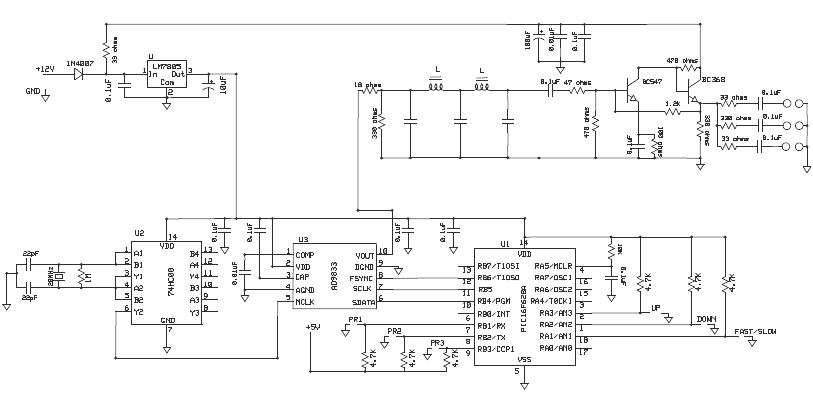
Below is the modified circuit of the DDS to accommodate the Preset frequency switches:
Click Here to download the PDF.


 Downloads below:

DDSv4 ASM file: Click Here (ASM)
DDSv4 HEX file: Click Here (HEX)
DDSv4 Complete project file: Click Here (ZIP)
The DDS with Preset function was just a prototype and the PCB does not exist yet. Depending on the demand, the PCB's will be made.Also as usual, suggestions and comments are most welcomed and noted.


Stay tuned for another exciting feature to be added to DDS pretty soon!!!!


Friday, June 8, 2012

DDS Updated:EEPROM Memory- 8th June 2012

Greeting Everyone.....

We have just updated the DDS yet again to keep it alive and not forgotten.

What is change log?

Previously, we had fine tuned the DDS to change with 54Hz frequency and changed the time delay to 0.5 seconds. Now the new DDS update has a new feature where the previously set frequency can be loaded back.

To explain in simple terms, you have set a particular frequency and would like to retain the same frequency when you switch off and back on, well now its possible. Earlier when you switch off the DDS, an initially programmed frequency would be loaded in the AD9833. But now you can have previously set frequency once you switch on the DDS. 

So how did we do it. We used the EEPROM available in the PIC16F628A to write the present frequency and again read the EEPROM to load the frequency. Hence even when the DDS is cut-off from the supply, the frequency will remain in the EEPROM Memory and will be loaded once the power is wupplied back to the DDS.

The program as the subroutines for the EEPROM read and write separately andmore details are provided in the datasheet of the PIC16F628A. The DDS program is available for download in the below links as well as the DOWNLOAD tab.

The DDS program is provide below for use:

Version 3.0 Click Here (ASM) and Click Here (HEX) .

Complete project file Click Here 

Friday, June 1, 2012

DDS Update: New Program with 50Hz tuning

Hello everyone.

We are working on the DDS and have updated the new program for the fine tuning (Slow bit tuning). The program is written for the PIC16F628A with the following features:

  • The slow/fine tuning is adjusted to 54 Hz frequency up and down.
  • The range of the slow/fine tuning is no more limited and can be adjusted to any range of frequency.
  • The delay between the frequency switching is reduced to 0.5sec. Hence faster band scan. 

We have incorporated the DDS board to out JOTA TRx. 40 and have tested it on the air. Smooth transitions between the frequency and on-spot frequency setting.

Dr. Manoj, VU3KER will the first one to take our TRx. equipped with DDS for testing and feedback.

You can find the ASM, HEX and the complete project below for download:

DDS program Version 2.0 : Click Here (ASM) and Click Here (HEX)

Complete project file: Click here

Tuesday, May 29, 2012

Charge Controller - Solar to 12V Battery

Welcome back fellow bloggers, readers, well-wishers and mates.

If you have observed, we at RnD have not been posting your findings and projects from the month of April. Why? Well, the RnD team is quite busy researching, destroying and putting our hands into power modules. For the past few days, members of RnD are testing and getting the shock of their life with SMPS amd MOSFET's jumping around the Lab. With a lot of shocking experience in the SMPS technology the team had a lot of charge and enthusiasm to step over to the Charge Controller.

Coming to the Charge Controller, we wanted to build one which can charge a 12V, 100Ah Battery. Why did we want to build a Solar Charge Controller? Sorry but its a Company Secret. Lets just say we want fellow people to utilize the Solar energy that we have in everyone's daily life. It's free and there is not charge or Tax to use Solar Energy (Fingers crossed that no rule will come hopefully).

An adaptation of the The Micro M+ from The ARRL Handbook 2002 edition was built in the RnD Labs. Again, reminder that it is an adaptation and not a copy as the article has a lot of components that is mentioned is American components which may or may not be available in the Bangalore, Indian electronics component market. If anyone would like to read the article, refer any of the ARRL handbooks from 2002 to 2009.

The Charge Controller was first test last week with a power supply (which is not correct/method - but we did not have a Solar Panel). The charging of the battery was fine when the battery was discharged and the charge controller would stop charging when the battery was fully charged. Now for the real test, we requested TATA BP SOLAR to help us out and test the prototype. Their facility has a lot of equipment and were very kind enough to help us. A 80W solar array panel was provided and our charge controller worked beautifully. The battery was a tubular 40Ah battery and the charge controller was cool and was doing the job.

Some of the features of the charge controller:

  • The Charge Controller uses a P-Channel MOSFET (IRF9540)
  • The Charge Controller runs on the Solar power and hence does not require any additional power supply. Thus, the charge controller will sleep during night time and does not draw any power from the battery
    .
Few pictures of the Charge Controller:


The overall circuit on a single PCB
Front Panel to show the various indications

The back panel which provides the options of connecting the Solar Array panel and Battery to charge.


Here is the schematic of the Charge Controller : Click Here


We shall keep updating the post for more info and finding. Suggestions are most welcome and doubts will be cleared if any.